
Power Camera ZBrush Plugin 3D model
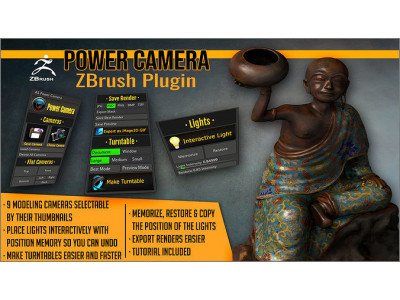
Power Camera ZBrush Plugin 3D model
| Brand: | artisticsquad |
| Product Code: | 4371618 |
| Availability: | In Stock |
-
$15.00
- Ex Tax: $15.00
Power Camera is a ZBrush plugin (for 2021.6, and up ) that includes:
- Visual selector of 9 cameras with thumbnails, for easier modeling.
- Tools for placing lights interactively (watching the result as you move it) with memory that can restore a light position as it was, or copy it to another light.
- A very easy turntable generator.
- Saving renders in several formats quickly, with or without automatic export of mask. A must have for any ZBrush modeler!
CAMERAS This plugin creates an independent visual system of 9 cameras that are used for modeling.
- 9 cameras for help you in modeling, that are independent from your scene's cameras and don't override them.
- Visual selector of 9 cameras that can be chosen clicking on their thumbnails.
- Quick button for saving a camera.
- Load a camera entering its number or by clicking their thumbnails in the selector.
- Delete all defined cameras.
- Cameras are remembered between ZBrush sessions, and are only forgotten if you delete or override them with new cameras.
- Buttons for chosing flat cameras: top, bottom, left, right, front, and back.
LIGHTS Put lights with your mouse, memorize and restore them as you need.
- Button for setting the Interactive Light that also memorizes the position of the light before you move it.
- Memorize button for saving the position of the current light, so you can restore it or copy it to another light.
- Restore button that applies the memorized position to the current light, so you can undo what you don't like.
- Dial for setting light intensity, and a button that restores the intensity to 0.85.
SAVE RENDER Export a render in different formats quickly.
- Buttons for setting the format of your save, so you can quickly export in several formats.
- Switch for choosing if you export the mask or not automatically.
- Save a Best or Preview render with the settings chosen on one click.
- Export as iMage3D GIF clicking just one button, for sharing your model on the web.
TURNTABLE MAKER Get a good turntable easier and faster.
- Switches for choosing to render all the ZBrush window, or the document only.
- Switches for the size.
- Buttons for Best or Preview quality.
- All in one button that uses the options above, and makes a turntable as you usually need: rotating in the Y axis, without watermark. It clicks on all the needed options and buttons, and you quickly get the desired result as an mpeg movie.
| Animated | No |
| Geometry | - |
| Materials | No |
| Model ID | #4371618 |
| PBR | No |
| Plugins used | No |
| Polygons | |
| Publish date | 2023-03-18 |
| Rigged | No |
| Textures | No |
| Unwrapped UVs | Unknown |
| UV Mapping | No |
| Vertices | - |
| VR / AR / Low-poly | No |